SMS Opt-In Flow
Last updated: 2026-05-29
SMS is optional. It is never required to use EveryoneSnaps.
Every guest at every event gets their photos through whichever of these channels they prefer — no SMS consent is needed to use any of the first two:
- 1.Scan the on-screen QR code — instantly opens the gallery on the guest's phone. The default path. No phone number, no email, no consent box.
- 2.Type an email address — free, no SMS consent involved. The booth sends a one-time link via email.
- 3.Type a mobile number (SMS — opt-in) — only if the guest prefers SMS over the other two. Requires entering their own number AND ticking the consent checkbox below. Declining this option has no effect on access to the photos: the QR and email paths remain open and free of charge.
Server-side, an SMS send is blocked unless a matching consent row exists. There is no path through the booth UI where consent is collected as a precondition for receiving photos.
Booth consent screen
When — and only when — a guest selects the SMS option in step 3 above, the booth renders the consent screen below. The Send button is disabled until both the consent box is ticked AND a valid phone number is entered. Guests who back out of this screen still see the QR and email options unchanged.
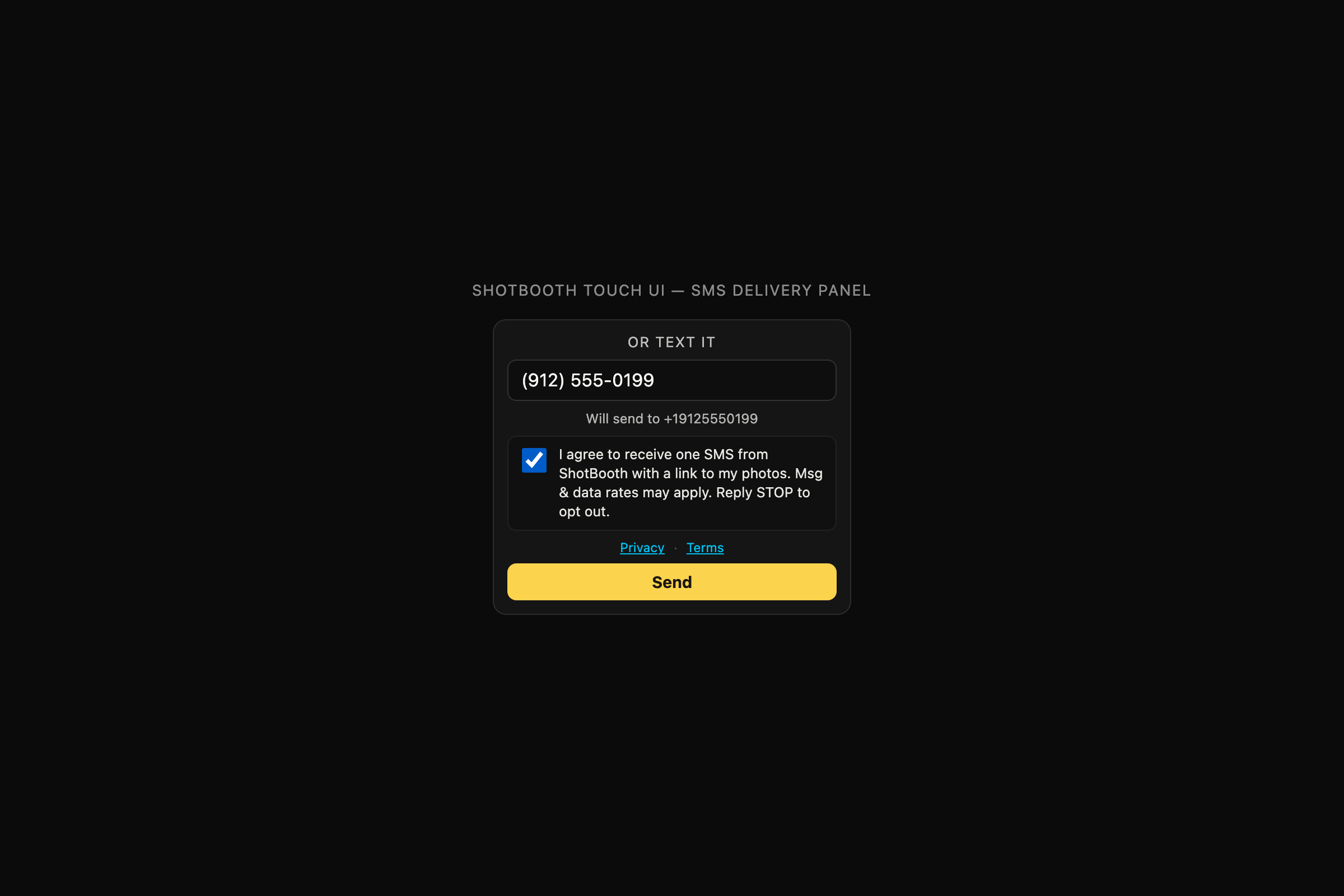
Consent text shown at the booth (verbatim)
I agree to receive one SMS from EveryoneSnaps with a link to my photos. Msg & data rates may apply. Reply STOP to opt out.
The booth records each consent locally and POSTs it to everyonesnaps.com before calling Twilio. A consent row is keyed by phone number, consent text, version, IP, user-agent, and timestamp, and is retained for at least four years for A2P 10DLC audit.
Sample SMS we send
Your EveryoneSnaps photos are ready! View & download: https://everyonesnaps.com/g/abc123 Reply STOP to opt out.
Transactional only — one message per session the guest explicitly requests. No marketing, no recurring sends. Reply STOP to opt out, HELP for help.
More
See our Privacy Policy for how phone numbers are handled and our Terms of Service for the full SMS program terms (frequency, cost, opt-out, help).